
Sync GitHub Dependabot alerts into Asana
An open-source tool that bridges Dependabot alerts into the workflow tool your team already uses. One Docker command.

Hey, I’m Marco and welcome to my newsletter!
A few months ago I noticed the same pattern across multiple teams:
Dependabot alerts were technically enabled, but nobody was really looking at them.
Not because people didn’t care about security. The problem was simpler: developers spend their day in Asana, Jira, or Linear, not in GitHub’s Security tab.
So vulnerabilities stayed open for weeks, sometimes months, and eventually became background noise.
To fix that, I built security-workflow-sync.
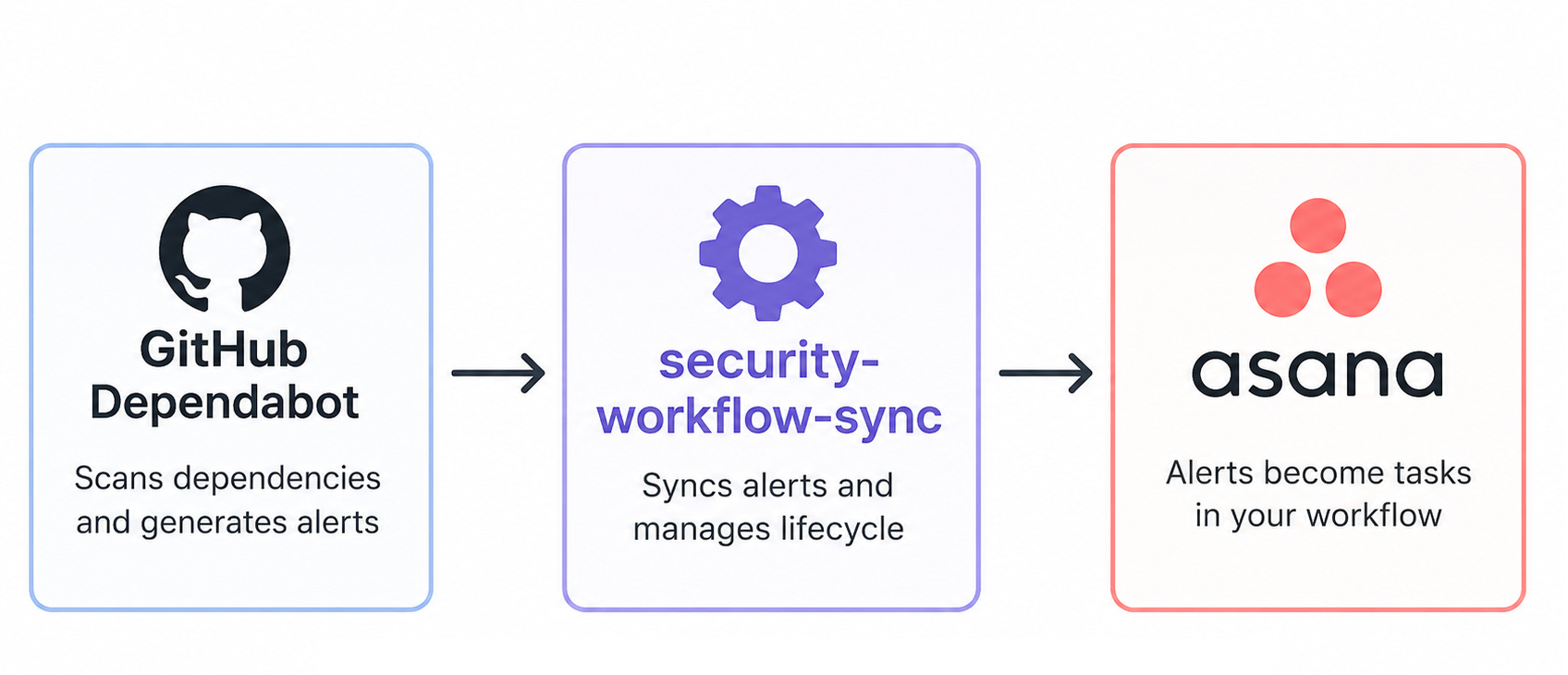
It’s a small open source tool that reads Dependabot alerts from GitHub and syncs them into the workflow system your team already uses.
Today it supports Asana. Jira, Linear, and GitHub Issues are planned next.
🔧 The solution
security-workflow-sync connects GitHub Dependabot with your task management tool.
It fetches open Dependabot alerts from a GitHub organization and creates matching tasks in Asana.
The tool itself does not scan dependencies and it does not replace existing security tooling. Dependabot still handles detection. This project only handles synchronization and task ownership.
Everything runs from a single Docker command, so you can run it locally, from CI, or from a scheduled cron job.
🔑 Prerequisites
Before running the tool, two things must be enabled on the GitHub side for each repository you want to monitor:
Dependency graph: GitHub parses your manifest files (package.json, requirements.txt, pom.xml, …)
Dependabot alerts: GitHub matches your dependencies against the Advisory Database and produces alerts
Both settings can be enabled at organization level.
One important detail: enable “Automatically enable for new repositories”, otherwise newly-created repositories will silently miss Dependabot coverage.
You'll also need a GitHub Personal Access Token with the `security_events` scope (authorized for the organization) and an Asana Personal Access Token.
📦 Step 1: Bootstrap the Asana project
The `bootstrap` command creates a new Asana project with the right sections and custom fields. Run it once:
docker run --rm --pull always \
  -e ASANA_ACCESS_TOKEN=... \
  marcomoauro/security-workflow-sync:latest bootstrap
If your token has access to a single Asana workspace, it gets auto-detected. If you belong to multiple workspaces, the command lists them and asks you to pick one via ASANA_WORKSPACE_GID.
The command prints the generated ASANA_PROJECT_GID. You’ll need it for the sync step.
marcomoauro@MacBook-Pro-2 ~ % docker run --rm --pull always \
  -e ASANA_ACCESS_TOKEN=XYZ \
  marcomoauro/security-workflow-sync:latest bootstrap
[info] Auto-detected Asana workspace: Acme (991745504083).
[info] Creating Asana project "Security Findings" in workspace 991745504083…
[info] Created project 1215096078675826.
[info] Created section "Critical".
[info] Created section "High".
[info] Created section "Medium".
[info] Created section "Low".
[info] Created section "Team Assignment".
[info] Reusing existing custom field "SWS: Severity" (1215098554617643).
[info] Reusing existing custom field "SWS: Repository" (1215095156543835).
[info] Reusing existing custom field "SWS: Package" (1215095954783217).
[info] Reusing existing custom field "SWS: Tech Team" (1215094188188106).
[info] Reusing existing custom field "SWS: Advisory" (1215294138228970).
[info] Reusing existing custom field "SWS: Advisory URL" (1245094997344211).
[info] Reusing existing custom field "SWS: Deduplication ID" (1215194138115263).

Bootstrap complete.
Export the following env var when running `sws sync`:

  ASANA_PROJECT_GID=1215093077675836

Next steps:
  1. Run `sws sync` to pull current Dependabot alerts into the project.
     The first sync also creates one placeholder task in the "Team Assignment"
     section for each repository it encounters.
  2. After that first sync, open the Asana project and set the
     "SWS: Tech Team" field on each placeholder.
  3. From the next sync onward, every alert for that repository will
     inherit the team automatically.
🔄 Step 2: Sync
docker run --rm --pull always \
  -e GITHUB_TOKEN=... \
  -e GITHUB_ORG=... \
  -e ASANA_ACCESS_TOKEN=... \
  -e ASANA_PROJECT_GID=... \
  marcomoauro/security-workflow-sync:latest sync
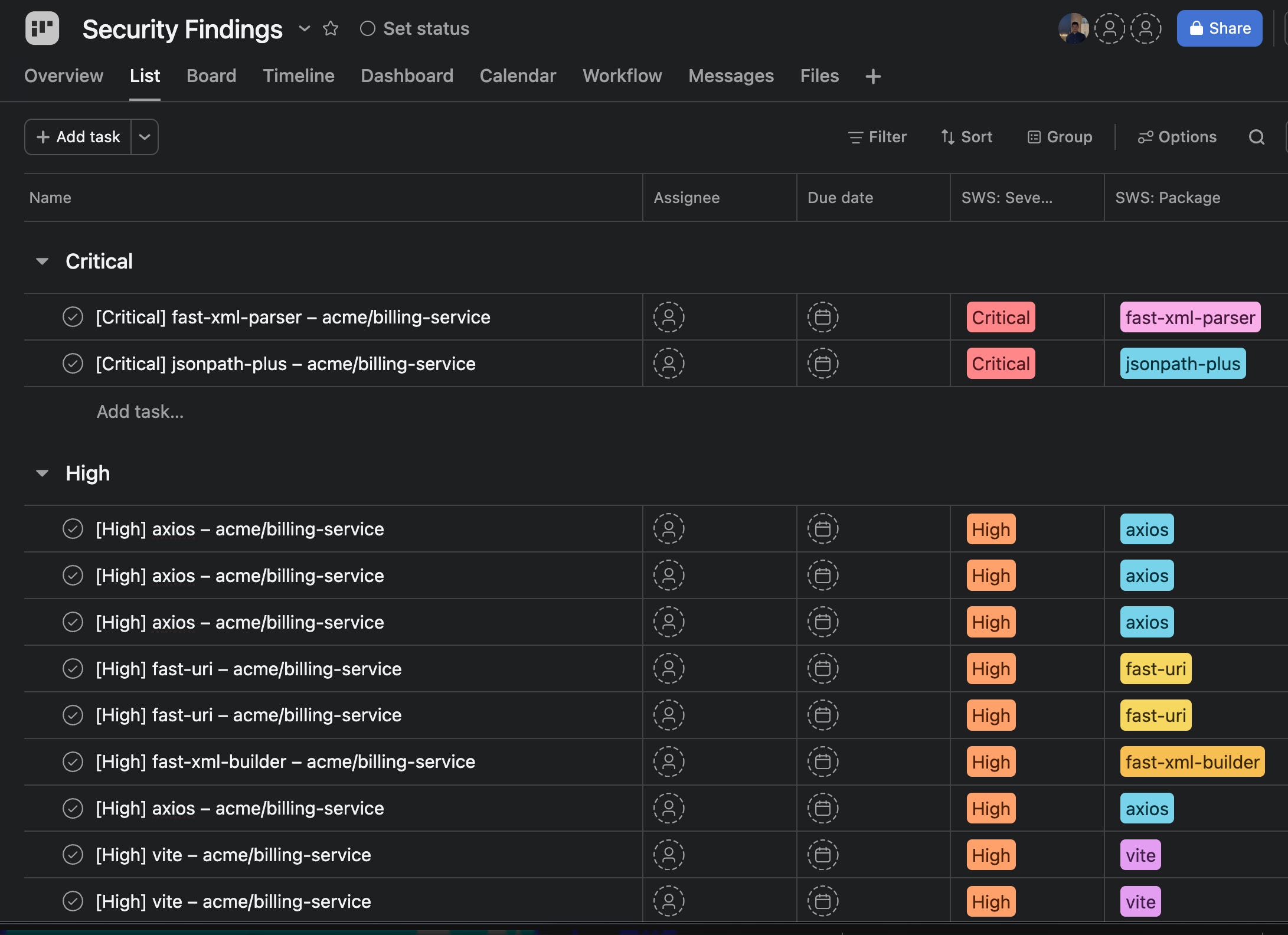
The first sync creates one task for each open vulnerability and places it into the corresponding severity section.
The task name follows the format [Severity] package - owner/repo.
The task notes include:
advisory link
vulnerable version range
affected manifest files
first patched version.
Running the sync multiple times is safe. Existing alerts are updated instead of recreated.
👥 Team ownership
When the sync sees a repository for the first time, it creates a placeholder record in the Team Assignment section with the repo name. You manually set the Tech Team value on that placeholder once.
From that moment, every alert for that repository automatically inherits the assigned team, including across syncs and reopened alerts. The team field is append-only: once set, the tool never overwrites it on individual tasks. Manual edits made directly inside Asana stick.
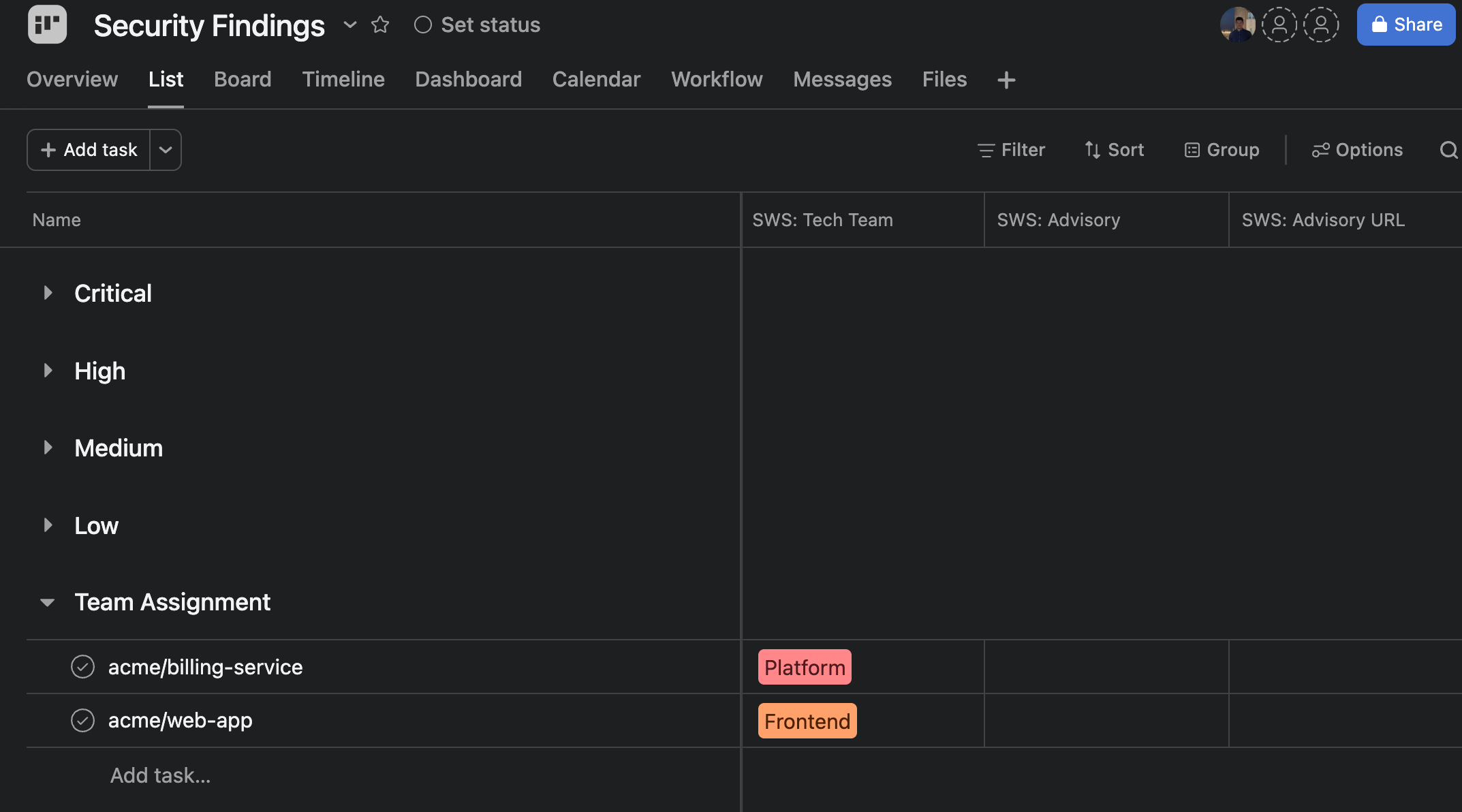
This avoids having to assign ownership manually for every new alert.
🎯 Filtering by repository
If you want to roll this out gradually, you can limit the sync to a subset of repositories:
docker run --rm --pull always <env vars> marcomoauro/security-workflow-sync:latest sync \
  --include-repos acme/web-app,acme/billing-service
When --include-repos is set, the tool fetches alerts only from those repos via GitHub’s per-repo Dependabot endpoint. For small rollouts this is also much faster than scanning the whole organization.
--exclude-repos can be used to skip archived or noisy repositories.
🕐 Putting it on a cron
Here’s an example GitHub Actions workflow that runs the sync hourly:
name: security-workflow-sync
on:
  schedule:
    - cron: '0 * * * *'

jobs:
  sync:
    runs-on: ubuntu-latest
    steps:
      - uses: actions/checkout@v4
      - name: Sync
        run: |
          docker run --rm --pull always \
            -e GITHUB_TOKEN=${{ secrets.SWS_GITHUB_TOKEN }} \
            -e GITHUB_ORG=${{ vars.GITHUB_ORG }} \
            -e ASANA_ACCESS_TOKEN=${{ secrets.ASANA_TOKEN }} \
            -e ASANA_PROJECT_GID=${{ vars.ASANA_PROJECT_GID }} \
            marcomoauro/security-workflow-sync:latest sync
Every hour, new alerts appear in Asana; fixed or dismissed alerts get closed automatically, with a comment explaining why.
🗒️ Notes
Some implementation details worth knowing:
Duplicate alerts across multiple manifests are merged into a single Asana task.
Transient GitHub or Asana API failures are retried automatically.
Existing tasks are updated when task formatting changes across versions.
The sync keeps no local state and can safely run from multiple environments.
🚀 Roadmap
Jira, Linear, and GitHub Issues are next on the list. If you’d like one in particular prioritized, open an issue on the repo and tell me, real world use cases help me prioritize what to build next.
The README contains full setup instructions, required GitHub settings, cron examples, and troubleshooting notes:
https://github.com/marcomoauro/security-workflow-sync
If you end up trying the project, feel free to open an issue or send feedback.
Marco